Desktop icon alignment in LisaGUI
Another LisaGUI post is long overdue so...
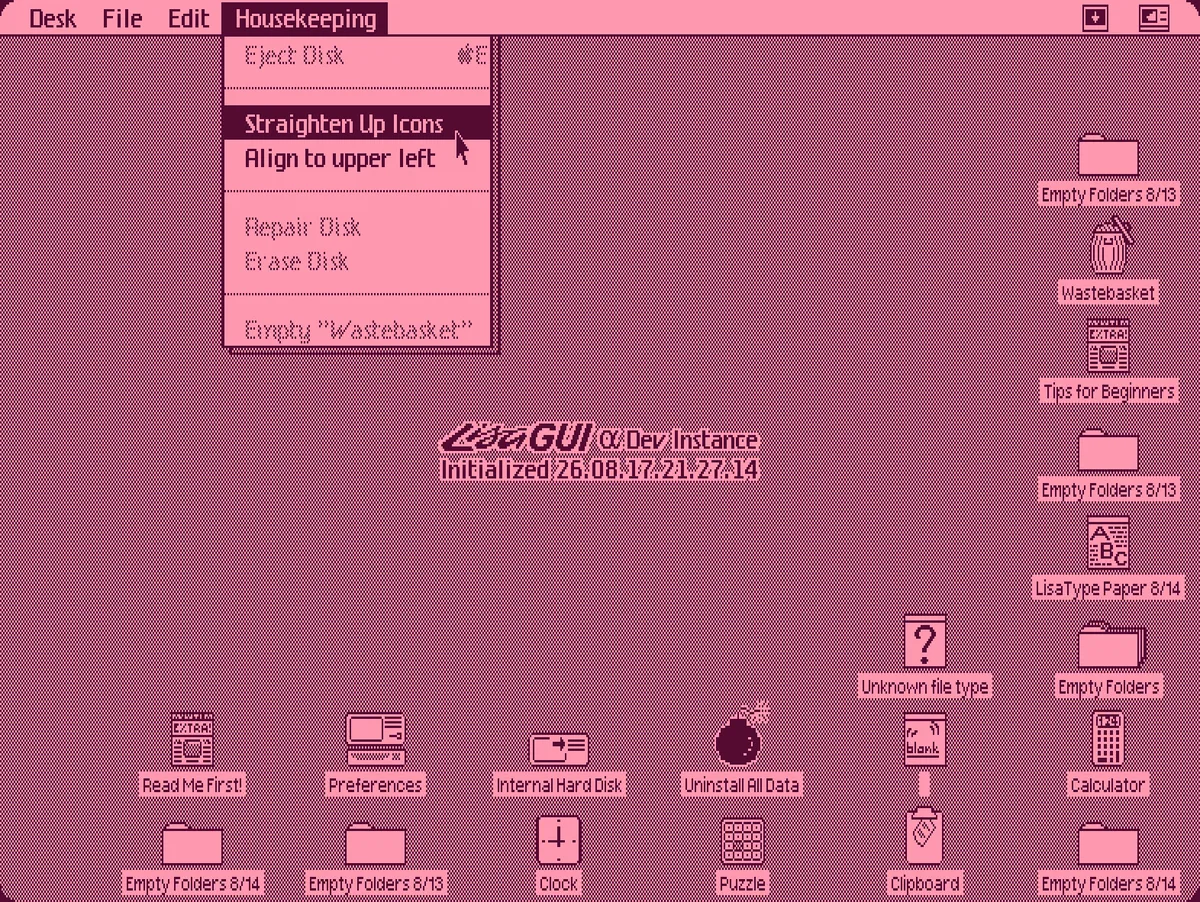
On the Lisa, the command to align icons to a grid behaves differently depending on context:
- In folder windows, icons are placed along the top edge of the window from left to right. The layout wraps to a new row at the width of the window, and is built downwards until all icons have been placed.
- On the desktop, icon placement alternates between filling up the bottommost available row (from right to left) and the rightmost available column (from bottom to top). This continues until the screen is full.
In LisaGUI, I had implemented the former algorithm for arranging icons inside windows, and until now it was also good-enough™ for use on the desktop. I felt no immediate pressure to implement the latter. LisaGUI, as a web app, is always at the mercy of being resized by a user. Given windows are resized from the bottom right corner, aligning icons to the bottom and right edges carries a constant risk of breaking that alignment upon window enlargement, or cropping most of the icons out of the frame if the window is shrunk along some dimension.
Over the past few weeks, as I've been hammering out all the items I have left on my LisaGUI to-do list, I decided it would be worth tackling. It's now implemented on the latest build, activated via the "Straighten Up Icons" menu option when the desktop is active. The original algorithm can still be used via a second option, "Align to upper left." The new algorithm is ideal if you use LisaGUI in fullscreen mode, or consistently at some fixed resolution.
One issue I considered was where to place excess icons if there's no room remaining on the desktop. The original wrapping algorithm would simply keep placing new rows past the bottom of the display.
When the new algorithm runs out of room, and the screen has been filled with a grid of icons, it starts placing another grid in the spaces between the existing icons, offset by about 60 pixels horizontally and a few pixels vertically. This allows the screen to be filled up a "second time" before you actually run out of space. At that point, the new algorithm falls back to the old one and places successive rows under the display.
The effect looks like this:
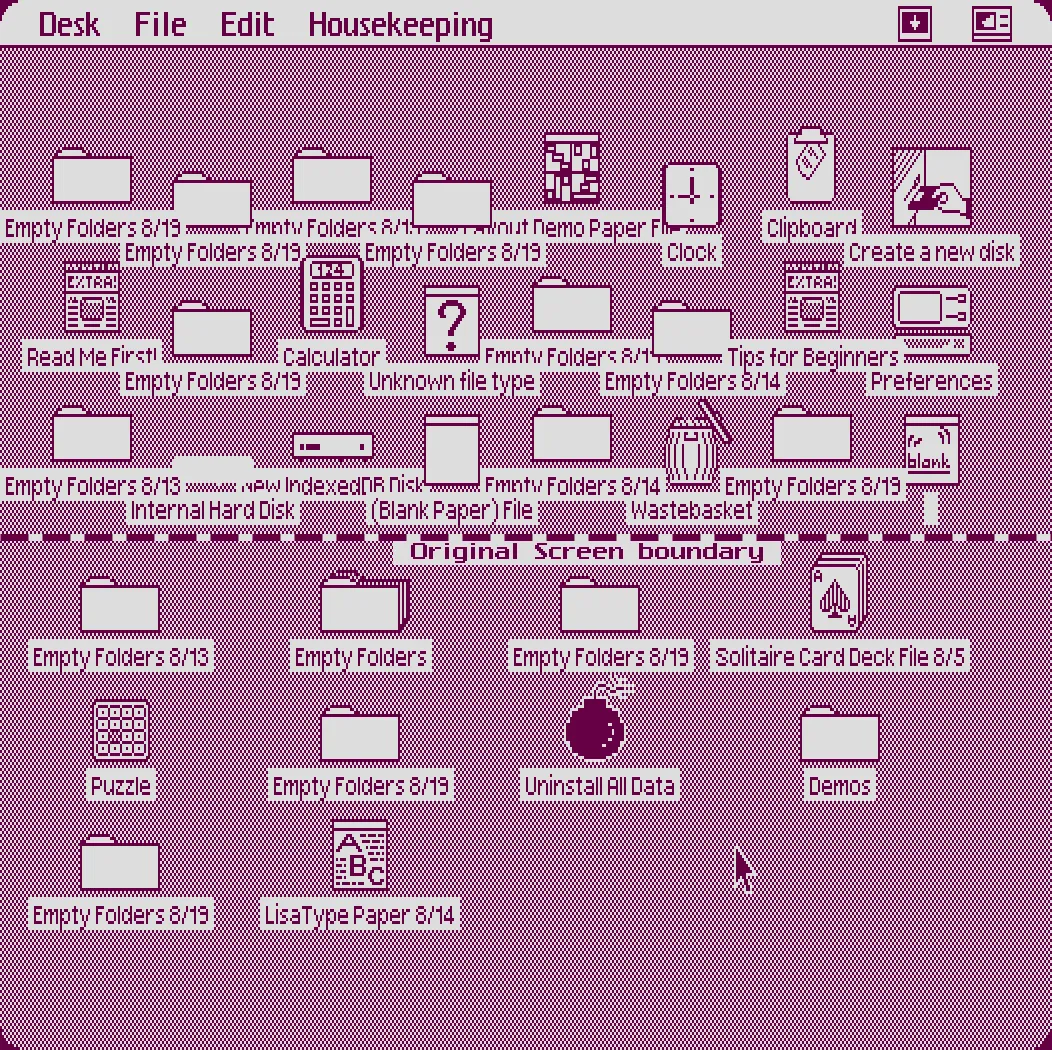
The dashed line shows where the bottom edge of the browser window was when the "Straighten Up Icons" command was run. I then expanded the height of the window to get all icons within the frame before taking this screenshot. This solution isn't perfect, but it's better than what I had before. With LisaGUI my motto is often WWLD (what would Lisa do)... if a design decision works at the Lisa's native 720x364 resolution, then it's good enough for me. At that size, you can fit about 88 icons on your desktop.
One other small thing. The build watermark now lives at the center of the screen... it doesn't make sense to keep it in a corner anymore, since icons are now likely to be placed on top of it. The sole exception is when modal dialogs are open; in such cases it will appear at the bottom right (necessary for the watermark to be visible when the installer is open). You can hide the build watermark by changing a setting in the Preferences app's "Developer" pane.
Some other recent user-facing features include:
- The calculator... I finally got around to finishing it. It's essentially a port of the Lisa's calculator app, with three calculation modes: four-function arithmetic, reverse polish notation, and an adding machine mode. It uses fixed-point arithmetic for accuracy. You can grab a copy from the "Desk Accessories" disk in the clock menu.
- Icon animations, where icons move to their new positions when automatically arranged, and on system startup and shutdown.
- Sound! LisaGUI now beeps when certain types of dialogs are displayed. The Lisa had a PC speaker; LisaGUI mimicks this using the Web Audio API.
- The hourglass cursor is used during "wait" dialogs, and in certain situations where input is blocked, like when icons are animating.
- Various small tweaks to the UI, such as changes to the mobile touch controls. A blank "hourglass" dialog that appears on a real Lisa while the OS loads now appears during start up.
- ......and truckloads of bug fixes and code refactoring.
Stay tuned for more updates...